New surveying instrument
The program calculates the accuracy of the observations used in a computation from the surveying instrument. Enter the features of the instrument that appear in the dialog box, so that the program uses that accuracy when weighting the observations:
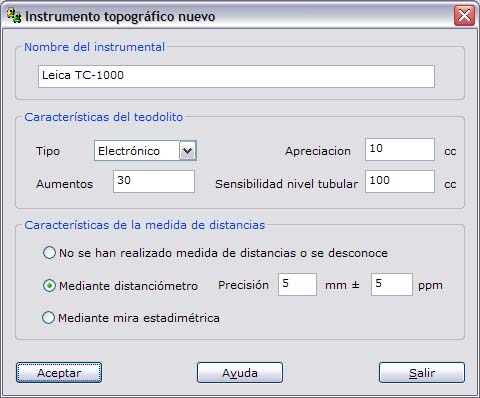
- Instrument name: Enter a unique name for the surveying instrument that helps you select it in later lists.
- Theodolite features
- Type: Select the type of theodolite, choosing between Optical and Electronic. This choice affects only the formula used to calculate the reading error of the instrument.
- Angle accuracy: Enter the smallest amount that the instrument can read in its angle measurement system.
- Magnification: Enter the magnification of the lenses.
- Level sensitivity: Enter the sensitivity of the instrument's tubular level.
- Distance measurement features: Select the type of distance measurement that was made, if it is known. If it is unknown, select the first option. If the instrument has an EDM (electronic distance measurement) for electromagnetic distance measurement, select the second option. In this case, the boxes for its accuracy are enabled, expressed as a fixed part (in millimeters) and a variable part (in parts per million). If a stadia rod has been used, select the third option.