View toolbars
In this dialog box you can choose the viewing options available in the program, which are:
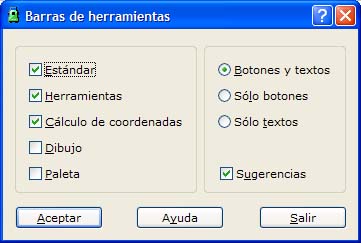
- Selection of the desired toolbars: Select the toolbars you use most often so that their icons and calls are more accessible.
- Selection of the toolbar information: You can choose whether the program shows only the icon, the icon with an explanatory text, or only the text.
- Selection of additional options: You can choose whether the program shows additional information when the mouse is placed over a tool, and whether it plays a sound when it finishes the computation operations.