INS_PHOTO_3P
Insert an image into the drawing file using three points.
Parameters
Does not accept parameters.
Notes
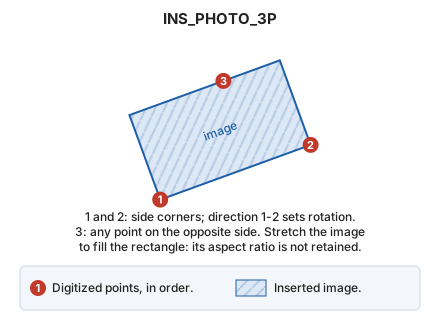
First choose the image file. Then enter 3 points: the first two are corners of one side, and the third is any point on the opposite side (it need not be a corner).
Define points graphically or with XY.
The image occupies the rectangle defined by the three digitized points. The first-to-second point direction determines its rotation. Stretch the image to fill the rectangle, even if this changes its aspect ratio.
Command characteristics
| Command type | Interactive command |
|---|---|
| Repeats automatically | No |
| Menu option | Draw/Image/By three points... |
| Toolbar | This command has no associated toolbar button |
| Extension | DigiNG.OrdenesRaster.dll |
| Implementation | Native |
| Related variables | No related variables |
| Related commands | INS_PHOTO INS_PHOTO_2P_AA |
| Internal name | {0339F78C-FCBF-46E3-8FCA-7F0B19B4D956} |