Tasks
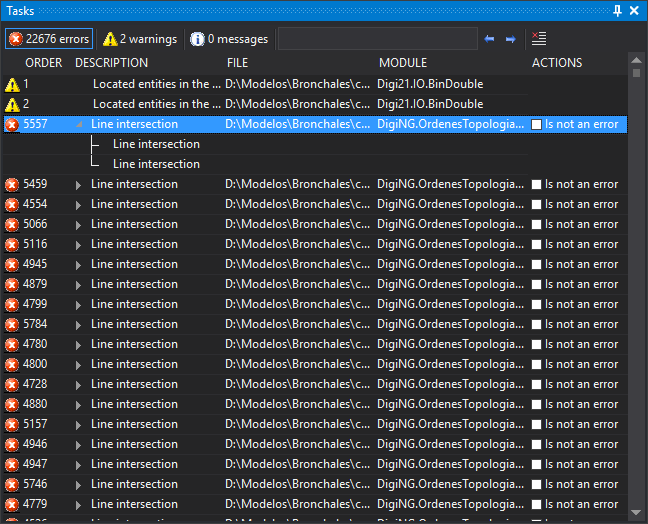
This pane displays tasks (errors, warnings, and messages) generated by commands such as DETECT_NO_CONNECTED_LINES or topological control commands, and by some importers when loading a drawing file.
Double-click a task to execute its action: center an entity in the drawing window, zoom to an entity, display a dialog box, and so on. Some tasks also have a context menu with additional options, opened by right-clicking.
Columns
| Column | Description |
|---|---|
| (untitled) | Icon indicating whether the task is an error, warning, or message. This column has an empty header; hovering over it displays "Category". |
| Command | Task number in generation order. |
| Description | Task description. |
| File | Drawing file containing the entity that generated the task. |
| Unit | Digi3D.AI extension that generated the task. |
| Actions | Is not an error checkbox, for tasks supporting it. |
Click a column title to sort tasks by that column in ascending or descending order.
When a command sends a task list together and requests sorting, identical tasks are grouped: the first shows an arrow to the left of the description; expand it to show the others as subtasks. Tasks arriving individually are not grouped.
Is not an error
Selecting Is not an error adds the task and its subtasks to tareasdescartadas.txt. The task remains in the pane. Tasks in that file are not displayed when generated again. Clearing the checkbox removes the task from the file.
tareasdescartadas.txt is in the folder of the last drawing file opened. It is read when opening the drawing file.
Toolbar
- Errors, Warnings, and Messages: show task counts for each type, including subtasks. Click to show or hide tasks of that type.
- Search: text entry box. Press Enter to select the next task whose description contains the text. The search is case-sensitive.
- Previous and Next: select the previous or next task whose description contains the text in Search.
- Delete tasks: remove all tasks from the pane.
Show the pane
Show the pane in any of these ways:
- Click its button on the Panels toolbar.
- Select Window/Tasks/Tasks.
- Press Alt+Shift+T.
Window/Tasks/Delete tasks runs DELETE_TASKS. It is enabled only if the pane contains tasks.