Active codes
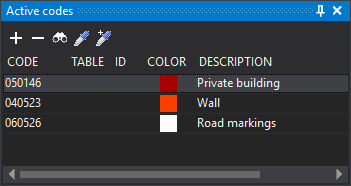
Active codes selects the active code or codes when working with multiple codes per geometry.
A new geometry receives every listed code when stored, not just the selected code. Only one row can be selected at a time.
The Multi-coding panel option under Interface for selecting codes controls the menu option that shows the pane and Add code, Remove code, Select code, Copy entity code and Add entity code as described below: without this option, the menu and all these buttons except Remove code are disabled. The list and Remove code always work.
When adding codes:
- Existing codes are not added again unless configuration allows duplicate codes on geometries.
- Codes disabled in the code table are not added.
- Table, ID and database attributes of all active codes are cleared.
Toolbar
The toolbar controls pane contents.
Buttons
- Add code: runs COD+, adding codes to the active list.
- Remove code: removes the selected active code. Disabled when none is selected. The last code cannot be removed.
- Select code: runs COD, replacing active codes with your selection.
- Copy entity code: runs CLONAR_CODIGOS, replacing active codes with those of the selected entity.
- Add entity code: runs CLONAR_CODIGOS+, adding the selected entity's codes to the active list.
Columns
- Code: code name.
- Table and ID: associated database table and record number, when working with a database.
- Color: code color in the code table.
- Description: code description in the code table.
Database
When working with a database, selecting a code makes Database fields show the selected code's table from the code table.
Showing the pane
Show it in either way:
- Select Window/Active codes.
- Press Alt+Shift+C.
Both methods are enabled only when Multi-coding panel is selected under Interface for selecting codes.