Grouping database attribute groups in Digi3D.NET
If you are creating mapping with Digi3D.NET and the geometries have database information, it is possible that the number of attributes to display is too large.
You may want to group the different fields based on some criteria, and that the grouped attributes are only visible when the user indicates it.
We have just added to Digi3D.NET the possibility to indicate in the field names (which appear in the database schema in the Code tables editor) an (optional) group name.Fields that have an associated group will be grouped in a node with that name in the panes and dialog boxes that show database fields.
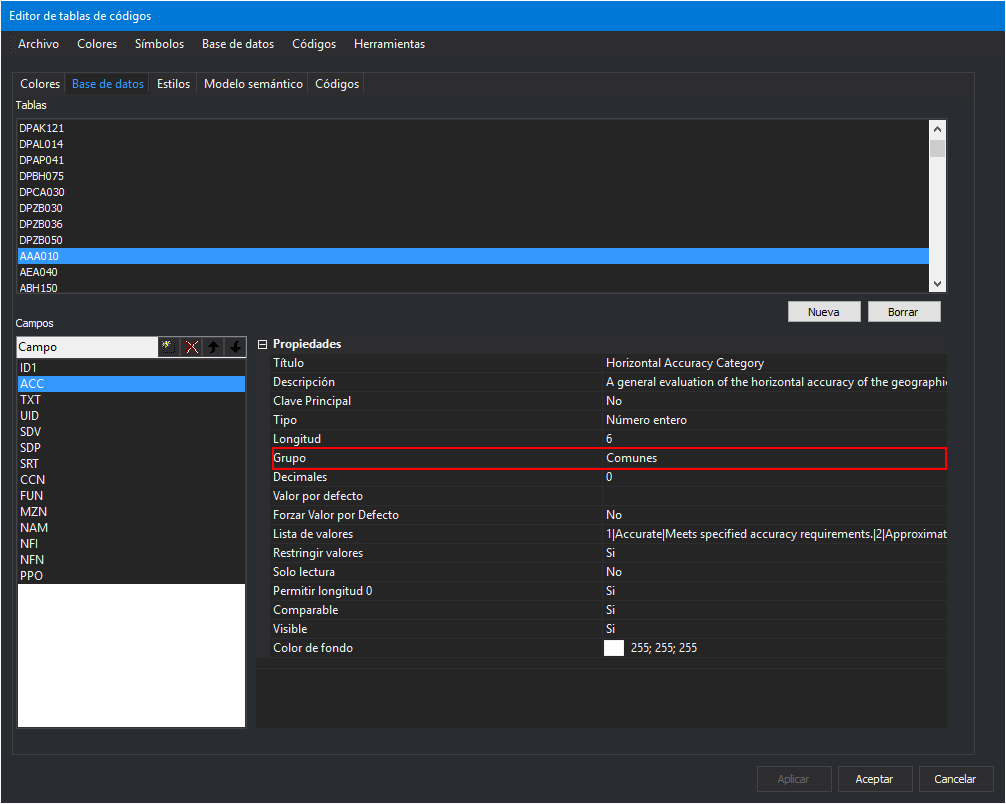 In the following screenshots, you can see the pane of Database fields showing the attributes of the table AAA010. You can check that a group named Common appears. By default Digi3D.NET shows the closed groups. It is the responsibility of the user to open the group that interests him. Fields that do not have a group associated are always shown.
[gallery ids="2791,2790" type="Rectangular"]
In this way we reduce the number of attributes visible by the user and we leave visible the 100% of the attributes that he will usually modify. The attributes that do not vary (or that do so on very few occasions) appear within the Common group, so that they do not bother the user.
You can see this new functionality in the following video: