Use your GPS as an input device in Digi3D.NET
We have added a new method to the programming interface of DigiNG called SendInputDeviceEvent that will allow us to program our own input devices in DigiNG.
Thanks to this new method, we have been able to create an extension for the drawing window that allows us to connect with a GPS and use the GPS data as input device of DigiNG, so we can draw any type of entity with this command.
Once installed, you can select the menu option Window/Classic GPS or Ventan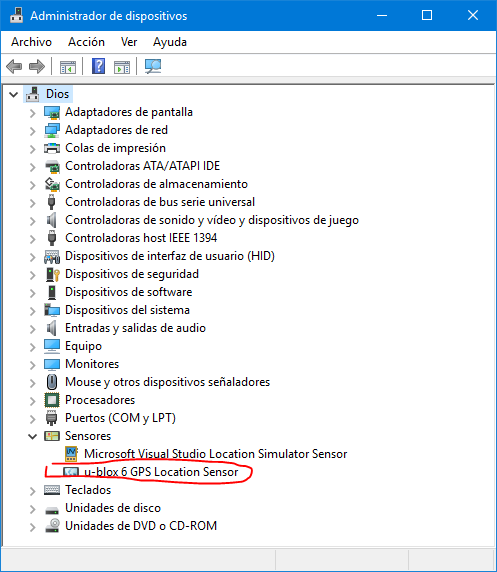 a/GPS by Location API.
If your GPS appears in the Device Manager as a sensor in the Sensors node (like in the screenshot on the right where you can see in the Sensors node my GPS that is a u-blox 6 GPS Location Sensor), you will need to use the GPS by Location API option. If your GPS does not appear in the Sensors node, you will need to use the Classic GPS option.
After selecting the menu option, the GPS pane will appear with four buttons:
a/GPS by Location API.
If your GPS appears in the Device Manager as a sensor in the Sensors node (like in the screenshot on the right where you can see in the Sensors node my GPS that is a u-blox 6 GPS Location Sensor), you will need to use the GPS by Location API option. If your GPS does not appear in the Sensors node, you will need to use the Classic GPS option.
After selecting the menu option, the GPS pane will appear with four buttons: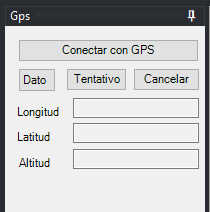
- Button Connect
- Button Data
- Button Snap
- Cancel button
The Connect button allows you to connect and disconnect from the GPS. Once you get connected to the GPS, it starts sending coordinates to the drawing window, that is, every time a different coordinate arrives, it is like moving the input device (handwheels, topomouse, etc.). When a connection is established with the GPS, the text of this button changes to Disconnect If we do not want to send coordinates to the drawing window, we will have to press this button to disconnect from the GPS. The button of Data has a special behavior: When you press it, it stays pressed. You have to press it a second time to push it out. It's as if you were pressing the foot pedal. Until you press it again, it won't lift. This is to facilitate the registration of polylines. If you have pressed the Data button and press either the Snap button or the Cancel button, the Data button will be pushed. The Snap button sends the snap event at the coordinates where the GPS is currently located. The Cancel button sends the cancel event at the coordinates where the GPS is currently located.