Hardware-accelerated geometric image transformations in the photogrammetric window
The day has come when Digi3D.NET can perform image transformation by hardware. Until today (due to the large number of users with graphics cards with a core like the nVidia Quadro FX1400) the application performed the geometric transformations by software. This operation was performed using all the cores of the computer to try to do it as fast as possible, but in practice it took a while, therefore we decided at the time to cache the transformed image tiles in the %TEMP% folder of the computer. This caused the free space of the hard disk to decrease considerably until it was exhausted (time in which you had to use the space free tool of Windows or third-party tools such as CCleaner. We couldn't continue supporting the nVidia Quadro FX 1400 graphics card all our lives, and it's time to say goodbye to it. Today we are releasing the new version of Digi3D.NET with card transformations. This version requires graphics cards with more than one core. From now on, the better our graphics card, the better performance will have Digi3D.NET. With this change we make the program not compatible with old computers (a year ago Microsoft stopped supporting Windows XP, and the 99% of the computers equipped with a Quadro FX 1400 have Windows XP), but the program gains a lot in specifications. We have made the following changes:
- Transformations (rotate in kappa, epipolars, etc) are instantaneous and without consuming a single byte on the hard disk. Now the program costs the same to show the transformed or original images.
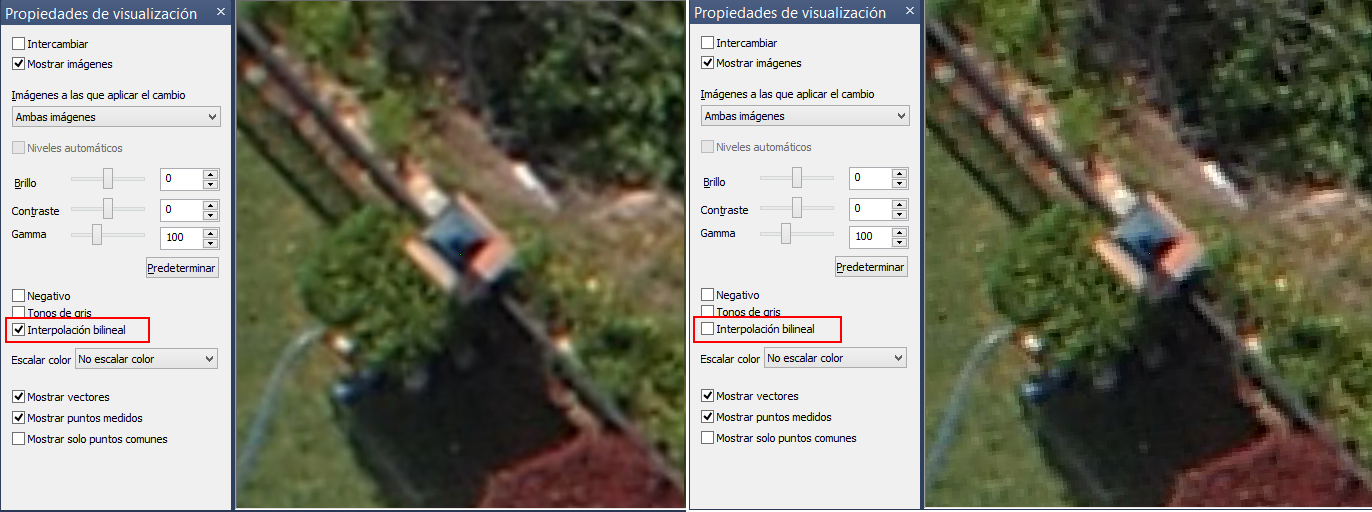
- We can now enable and disable (is enabled by default) the option to bilineally interpolate pixels when viewing images. This causes the pixels of the image to stop being appreciated when zooming in.
- Now the program memorizes the transformations of each of the images when closing the photogrammetric window, so that if we open a model and order to calculate its epipolar, when reopening that particular model, the images will already be oriented with the epipolar.

- New options to calculate epipolars (the one that transforms the left image least, the one that transforms the right image least and the one that retains the greatest verticality).
- The software Brightness/Contrast Method option has been removed and is now always hardware-based.
- Improvements have been made to projecting the geometries from the drawing file into the photogrammetric window. It is now not necessary to move the photogrammetric window in order for the geometries to appear.
You can see this new functionality in the following video [youtube:https://youtu.be/BV7uxMFM65A]