Topologies in Digi3D.NET
We added the Topology concept in Digi3D.NET, and that allows us to do things like automatically inserting centroids in topological floods and assign a dictionary of values to each centroid that we can use when exporting to GIS such as ArcGIS.
The code tables editor now has a new tab called Topologies that allows us to create a topology and assign a name, codes of the geometries that form the topology, a set of centroids as well as a key/value dictionary for each centroid.
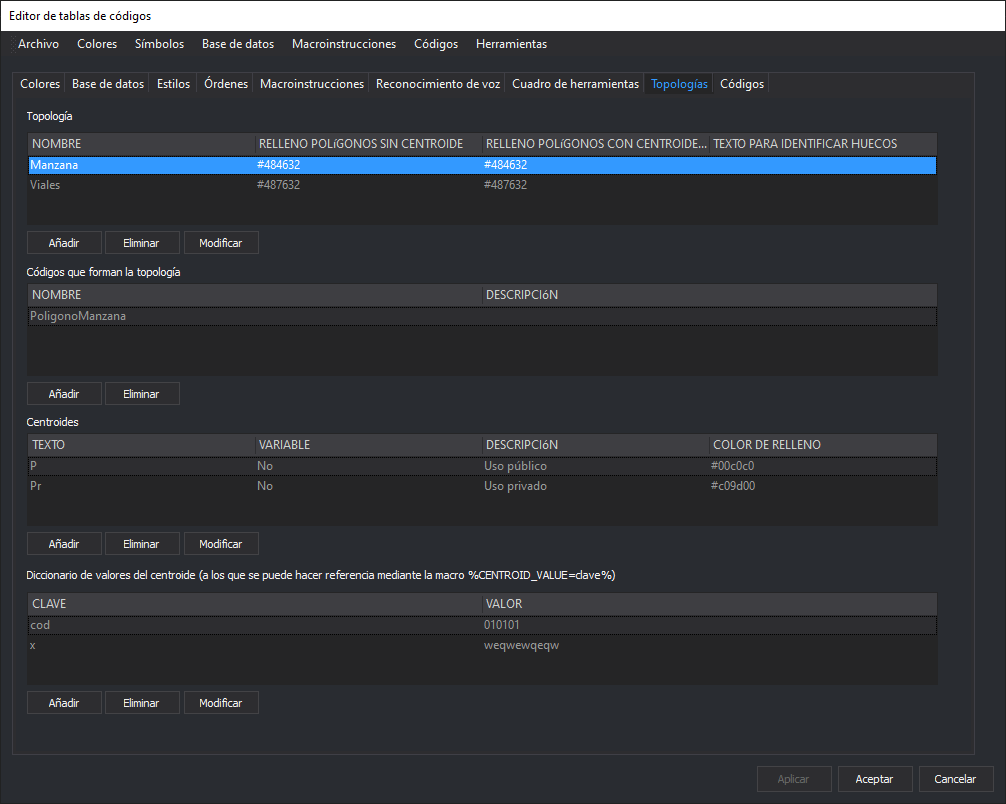
We can specify a fill color for polygons in the geometry that do not have a centroid, as well as a fill color for gaps, and we can assign a fill color based on the centroid.
We can also indicate whether a centroid has a fixed text (such as Building) or whether the user is allowed to add text, such as the name of a street).
In the video below we teach you how to add topologies in the code table editor as well as export to Shapefile with database attributes extracted from the code table itself.