Sayonara XP
It's time to say goodbye to Windows XP. Microsoft already forgot about it two years ago and after it we have gone through *Windows Vista, Windows 7, Windows 8, Windows 8.*1 and now Windows 10, however there are still many installations that continue to use it with our programs. It is time to renew both the computer and the operating system. Of all our programs, the only one that still maintained compatibility with Windows XP was Digi3D.NET until its version 2015.43.51.0, which was released on February 25 of 2016 at 12 hours, 7 minutes and 27 seconds exactly. Since then Digi3D.NET has grown a lot (you could check it in this blog), but in its BETA version. The BETA version will go to stable on the next day 15 of July 2016. The version that we will release that day will not be compatible with Windows XP. Since we are afraid that someone will download it and try to install it on their Windows XP (remember, we do not store backup copies of the installers) and do not have a backup copy of the previous version, we will publish version 2015.44.52.0 with date 25 of February 2016 at 12 hours, 7 minutes and 28 seconds, that is, with a publication date one second after the public version. This version is still compatible with Windows XP, and having a publication date one second after the previous one, it is certain that it will be downloaded and installed on computers that, although they do not have technical support subscription today, did have it on February 25. What modifications does this version that we just published have? Two modifications related to updates.
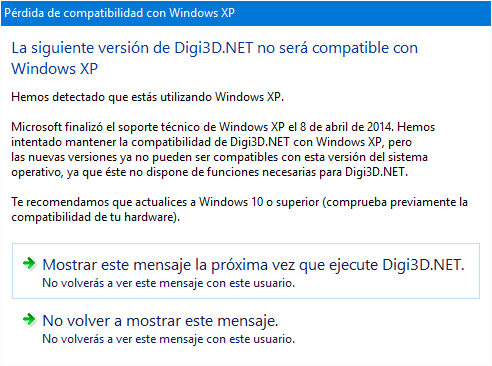
- When the program starts, it will show a dialog box indicating that the next version of the program that we download will no longer be compatible with Windows XP. This dialog box will appear every time we start the program. It has two buttons to close the dialog box: one that simply closes it and another that makes it not appear again (for this user, if you change user on the same machine, it will appear again).
You can see a screenshot of this dialog box below:
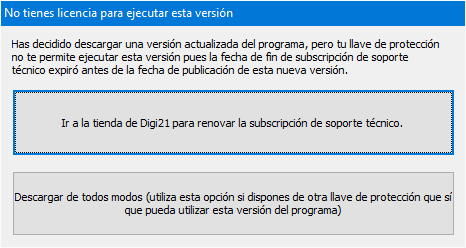
- If a new version is detected but the active dongle no longer has a support subscription, the program warns that it is not safe to download the new version because it cannot be used unless a support subscription or rental is purchased.
You can see a screenshot of this dialog box below:
 And this version is the last one with Windows XP support, starting with 15/07/2016 we will definitely say Sayonara to Windows XP.