Publish maps on the web using SVG (Scalable Vector Graphics)
Digi3D.NET has an exporter to Scalable Vector Graphics (.svg).
This is a vector format in 2D that has the characteristic of being standard and that most internet browsers implement natively, so if you generate a .svg file and publish it on the internet, your visitors can view the file without problems.
The format is scalable, which means that the user can zoom without losing quality, and there are many Scalable Vector Graphics editors, some free as InkScape.
To export to .svg, first specify the .svg export settings using the Code Table Editor.
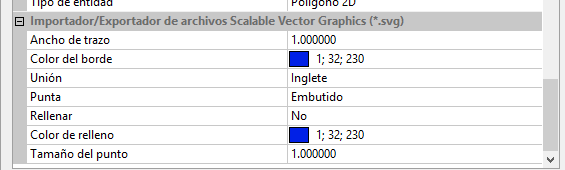 As you can see, you can specify the width of the strokes (in pixels), the color of the strokes, the type of junction between segments, the type of tip of the strokes, whether to fill or not the strokes, the fill color and for point entities, the radius of the generated point.
Once the translation parameters have been specified, we only have to follow the following steps:
- Load in Digi3D.NET the model to be exported.

- Select the menu option File/Export...
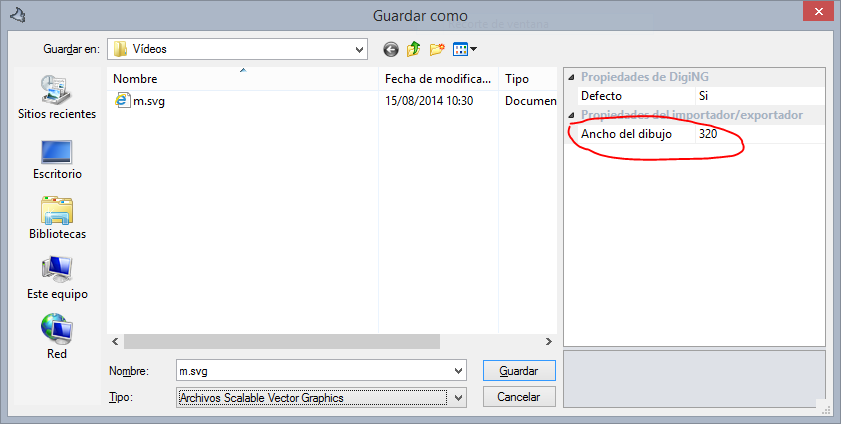
- In the Type drop-down, select Scalable Vector Graphics Files.
- In the field Drawing width specify the width in pixels that the drawing will have in the resulting file.
- Indicate the path where to generate the file.
- Press the Save button.
- The Select the reference coordinate system to be assigned to the file dialog box will appear.Specify the reference coordinate system in which you want to export the mapping and press the OK button.
And now we have our .svg file. If you double click on the file, an internet browser will open showing you the vectors. Now you can use a tool like IncScape to edit it. If you know a little bit of HTML you just have to copy the contents of the generated file into a .html file.
<!DOCTYPE html>
<html>
<body>

<h1>Aquí el mapa de mi pueblo</h1>

<!-- pega aquí el contenido del archivo .svg generado por Digi3D.NET -->
<svg width="100" height="100">

</svg>

</body>
</html>
Below you have a video in which we show you this functionality [youtube:http://youtu.be/l8Cap_G03IA]