New Semantic model menu
The vast majority of the features we have added to Digi3D.NET in the last few months were focused on performing real-time quality checks of mapping.
Thanks to these functionalities, the program informs the operator of errors at the same time as it digitizes an entity, but we did not have a tool that executed these tests on existing mapping.
We just added a new menu to Digi3D.NET called Semantic Model.
This menu will allow us on the one hand to enable or disable runtime tests (using the option Semantic Model/Analyze semantic model when digitizing entity), and on the other hand to run tests on existing geometries using the submenu Semantic Model/Analyze semantic model.
This submenu is dynamic and shows all the tags that appear in the code table (if in the code table we have added any tag to any code).
In the screenshot that heads this entry you can see that some codes have the tag RoadTranspFeatureOnGround, others have Annex_E, etc. If we select for example Annex_E, a semantic model analysis will be performed to all codes that have the tag Annex_E.
This menu also has an option called By code that shows a dialog box that allows us to select the code or codes of the entities to which we want to perform a semantic model analysis, and finally has the option visible geometries, which performs the analysis to the geometries that we have at this time activated in the drawing window.
The result of the tests is displayed in the results pane as you can see in the following screenshot:
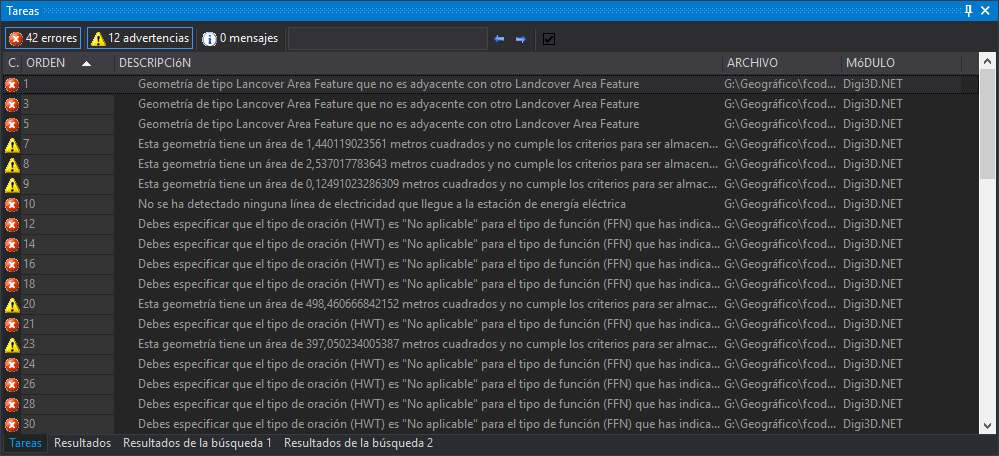 The tests are programmed as scripts in the code table. What you see in these screenshots are tests for the MGCP project. We have published the source code of the tests so that you can learn how to add your own tests in our source code repository on GitHub at https://github.com/digi21/mgcp
You can see this new feature in action in the video below:
The tests are programmed as scripts in the code table. What you see in these screenshots are tests for the MGCP project. We have published the source code of the tests so that you can learn how to add your own tests in our source code repository on GitHub at https://github.com/digi21/mgcp
You can see this new feature in action in the video below: