What's new in the PROYECTA_DEM command
The command PROYECTA_DEM from Digi3D.NET until now created a virtual triangulation, generated a .LAS file with points projected on that virtual triangulation and then loaded the .LAS file as a reference file.
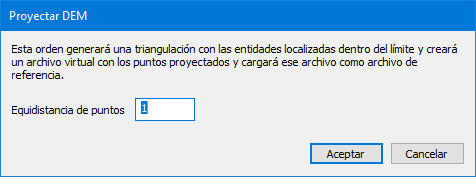
The only parameter that the dialog box of this command requested was the contour interval of points as you can see in the following screenshot.
 As you can see, there was no possibility to indicate the path of the .LAS file to be created (it was automatically created in the %TEMP% folder of the computer).
We have just made a modification that will allow us to specify if we want to create a .LAS file or a .TIF file or both, and also we can indicate if we want to load as reference files the created files.
Below is a screenshot of the new dialog box:
As you can see, there was no possibility to indicate the path of the .LAS file to be created (it was automatically created in the %TEMP% folder of the computer).
We have just made a modification that will allow us to specify if we want to create a .LAS file or a .TIF file or both, and also we can indicate if we want to load as reference files the created files.
Below is a screenshot of the new dialog box:
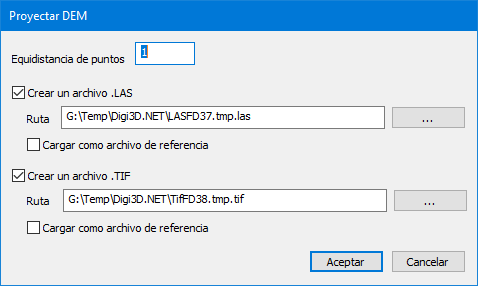 The OK button will only be enabled if we activate the options of Create .LAS file or Create .TIF file, and by default the dialog box is configured with the settings that this command has always had: With the options of Create .LAS file and Load as reference file (the .LAS file created) activated.
Below we show you in a video this new functionality:
The OK button will only be enabled if we activate the options of Create .LAS file or Create .TIF file, and by default the dialog box is configured with the settings that this command has always had: With the options of Create .LAS file and Load as reference file (the .LAS file created) activated.
Below we show you in a video this new functionality: