What's new in project settings
Digi3D.NET has for several years a little known functionality that is that of Use project files. When we have activated this option (through the option of the Tools/ Configuration/ User communication/ Use project files), the program makes two changes in its user interface:
- Enable menu item Tools/Configure projects...
- It greatly simplifies the Drawing file tab of the dialog box New project, since it does not show all the parameters, but only shows a field named Configuration with a dropdown that allows us to select from the configurations that we have configured using the tool of Configure projects.
This way it is avoided that the user makes mistakes such as selecting an incorrect table for a certain work, or an incorrect sigma, etc., in addition to simplifying everything for the user.
Below I show you the dialog box of New project, tab Drawing file with the option of Use project files enabled:
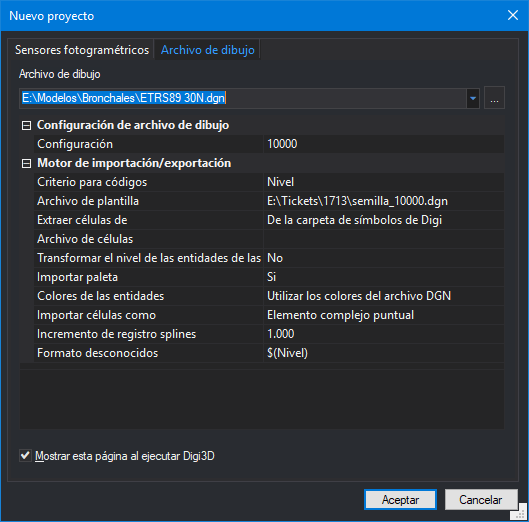 As you can see, the program asks for the configuration, and then depending on the extension of the drawing file selected, shows its import/export parameters. As the selected file is a .dgn, the configuration parameters of this format (which are many) are shown.
Today we present a novelty in this sense: We have modified the dialog box Configure projects to be able to indicate by means of a button if in addition to the parameters of reference system of the drawing window, register parameters and environment parameters, we also want to configure the translation parameters of each of the file formats supported by the program.
I show you below the new Configure Projects dialog box:
As you can see, the program asks for the configuration, and then depending on the extension of the drawing file selected, shows its import/export parameters. As the selected file is a .dgn, the configuration parameters of this format (which are many) are shown.
Today we present a novelty in this sense: We have modified the dialog box Configure projects to be able to indicate by means of a button if in addition to the parameters of reference system of the drawing window, register parameters and environment parameters, we also want to configure the translation parameters of each of the file formats supported by the program.
I show you below the new Configure Projects dialog box:
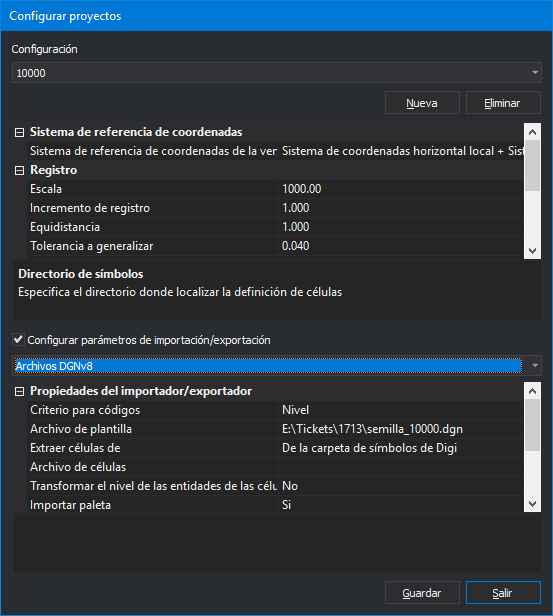 If we activate this option for a certain type of project, the program will never again ask us for these parameters either in the dialog box of New project or in the common dialog boxes of open file (which appear when executing commands like LOAD_F, IMPORT, EXPORT, etc.).
I show you below the dialog box of New project, tab Drawing file with this option enabled:
If we activate this option for a certain type of project, the program will never again ask us for these parameters either in the dialog box of New project or in the common dialog boxes of open file (which appear when executing commands like LOAD_F, IMPORT, EXPORT, etc.).
I show you below the dialog box of New project, tab Drawing file with this option enabled:
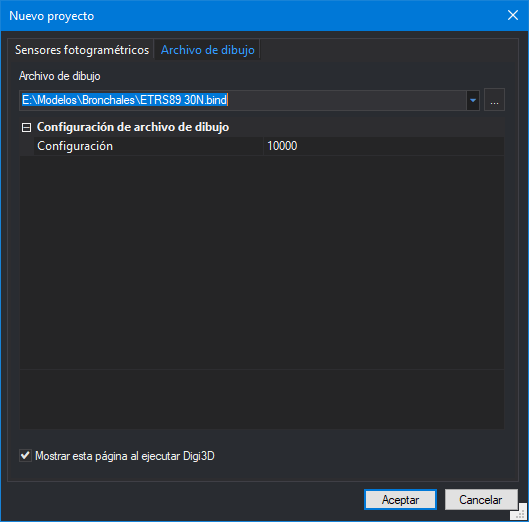 As you can see, it has been much simplified, and in this way the user does not have the possibility of making mistakes when configuring the import and export parameters.
You can see this new feature in action in the video below:
As you can see, it has been much simplified, and in this way the user does not have the possibility of making mistakes when configuring the import and export parameters.
You can see this new feature in action in the video below: