Changes to the PhotoScan file loading module
We have added a modification in the PhotoScan project loading module in Digi3D.NET that will allow us to work correctly in the scenario in which the user of PhotoScan makes him pass coordinates with orthometric height by coordinates with ellipsoidal heights.
PhotoScan internally works always with ellipsoidal elevations**.** If we provide correctly coordinates with orthometric elevations, it internally transforms them to ellipsoids and stores in the project file a reference system indicating that the operator correctly entered coordinates with orthometric elevations.
The problem is that in practice we have not seen a single PhotoScan project with orthometric coordinates. All, and when I say all I mean all the files that have come to us have ellipsoidal coordinates, however the operators assure us that they are.
So we have approached a company that has a license and we have done a study to clarify things once and for all. We have modified Digi3D.NET to assume the three possible scenarios that are:
- When creating the PhotoScan project the operator has entered coordinates of ground control points with ellipsoidal altitudes.
- When creating the PhotoScan project the operator has entered coordinates of ground control points with orthometric altitudes indicating it thus to PhotoScan
- When creating the PhotoScan project the operator has entered coordinates of ground control points with orthometric altitudes passing through ellipsoids.
The way to work correctly with PhotoScan is the 1 or the 2, but I repeat: the 100% of the PhotoScan projects that have come to our hands (through technical support tickets, files that we have uploaded via TeamViewer on our customers' computers, etc.) are made using the method 3.
And what is the reason why all the models we see are by the method 3?
There may be several reasons (lack of knowledge, not reading the instructions of PhotoScan or at least where it talks about geoid models, etc.), but we will focus on the user interface, and the problem is that the user interface does not help to locate reference systems with orthometric heights as you will check below:
PhotoScan has a dialog box in which we can indicate the coordinate reference system of the ground control points:
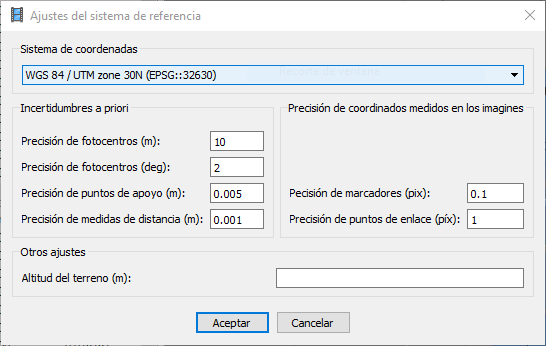
This dialog box has a drop-down (titled Coordinate System) that allows you to select the most recently used reference systems. If the reference system you are looking for is not in the drop-down, you have to select the three-dot option that displays a search dialog box that has all the EPSG systems supported by PhotoScan:
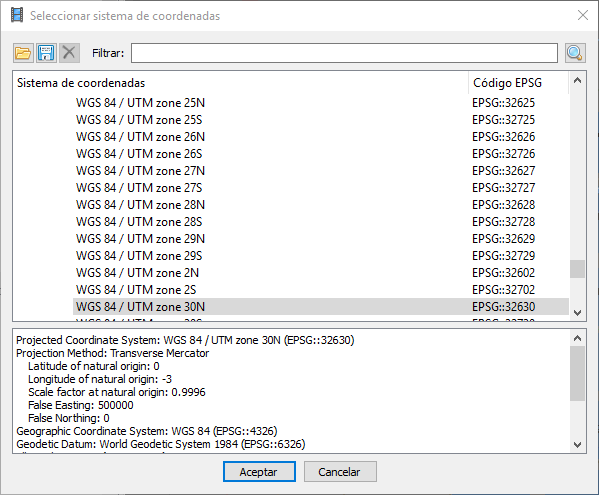
This dialog box is not as versatile as Digi3D.NET and does not allow you to create your own systems, only allows you to select some preconfigured, and as you can see in the screenshot above, **there is not a single preconfigured reference system with vertical component ** (well, actually there is one or two that are the only composite reference systems published by the EPSG database but in practice I do not think anyone uses).
In the screenshot above you can see that we have selected WGS84 / UTM Zone 30N, but we are not able to select
WGS84 / UTM Zone 30N + EGM2008 for example, as it does not exist in the preconfigured database of PhotoScan.
This dialog box does not have any button like "Create my own composite reference system" so we could not create the WGS84 / UTM Zone 30N + EGM2008 system, but what we can do is import a .PRJ file that defines that system. To do this, we will have to go to another program like Digi3D.NET and create a PRJ file using the dialog box of Coordinate Reference Systems, selecting the system we are interested in and pressing the Export button.
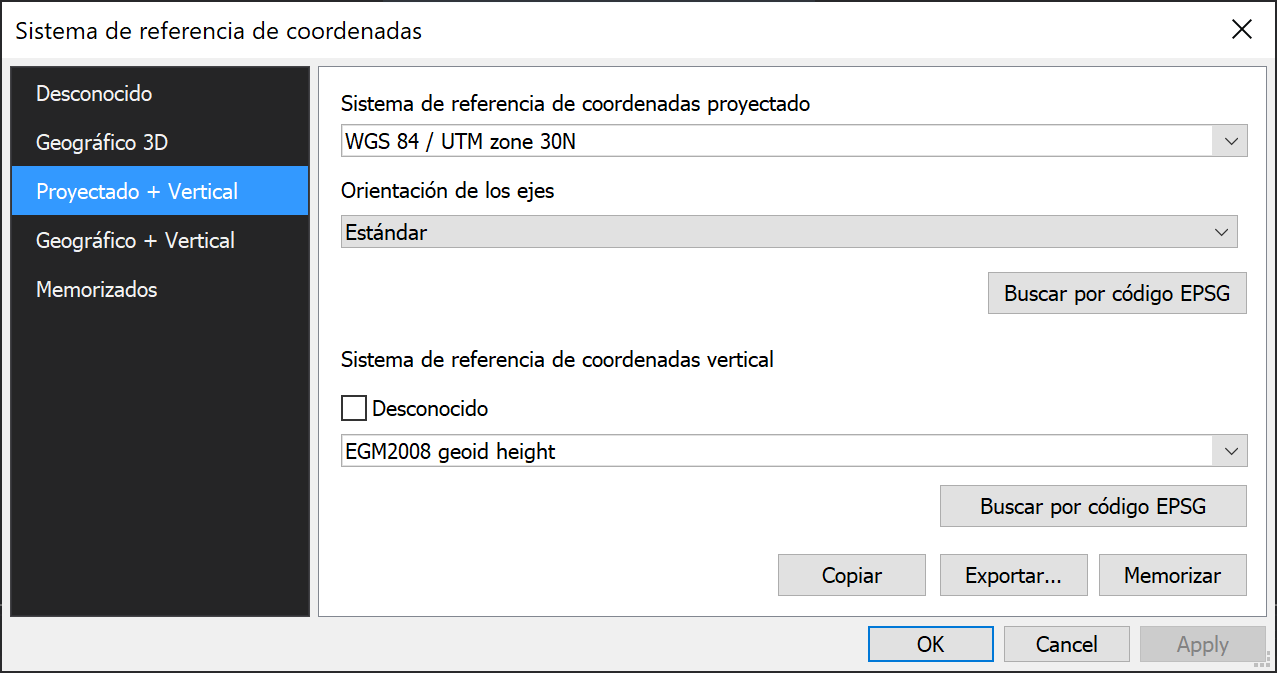
Once exported, we can import it into PhotoScan by pressing the folder button in the Select coordinate system dialog box and once imported, it will appear in the User-defined coordinate systems section as you can see in the following screenshot:
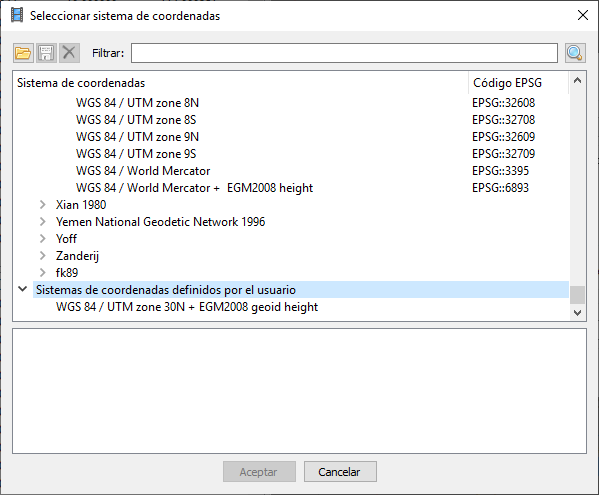
But you could not select this system yet! because in order to select it, you will have to have downloaded from the Agisoft page the EGM2008 geoid model and copy it to the corresponding folder of the program. Once the geoid model is installed, you can select this custom system as you can see in the following screenshot:
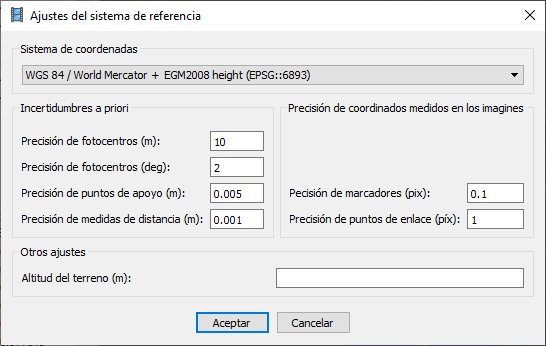
As you can see, it was not easy, but now PhotoScan will know how to transform the Z coordinates of the ground control points from orthometric to ellipsoidal, because as I indicated at the beginning of this post: PhotoScan always works in ellipsoids.
If you want to save yourself the previous steps and want to work well, you would have to transform the coordinates of the ground control points from orthometric to ellipsoidal before introducing them in PhotoScan. And personally I think that this is the best option, because in the case of Spain we do not use the geoid model EGM2008, but we use the model REDNAP Peninsula or REDNAP Canarias that are models with greater accuracy for our country and those geoid models are not available for PhotoScan (as far as I know).
In practice, we have not seen a single correctly configured project: users usually look for the 2D system in the reference system list (for example, WGS84 / UTM Zone 30N). Because no vertical system is mentioned, they accept it and assume PhotoScan's magic will know what to do with those heights. What they are actually doing is misleading PhotoScan.
The problem is that PhotoScan users are sure that they are doing it right and assure us that they are entering orthometric coordinates. This strong statement made us think that PhotoScan did not create correct WKT strings, and we even created a blog post (in which we crossed out a few paragraphs today) because we thought that PhotoScan forgot to put the vertical system in the WKT string of the project file, but it is not. If the PhotoScan user does not fool PhotoScan by entering coordinates with orthometric altitude, PhotoScan correctly creates a WKT string for a composite system in which the vertical system information is provided.
Knowing now that PhotoScan creates correct WKT strings (this is the first time we see a program other than Digi3D.NET that accepts WKT strings from composite systems) we find three possibilities:
- That the WKT string of the reference system of the PhotoScan file is composed. In this case, we can assume without a possibility of error that the heights of the ground control points that were entered in PhotoScan are orthometric and that they were also entered correctly in PhotoScan.
- That the WKT string of the PhotoScan file reference system is horizontal and that the coordinates that were entered had ellipsoidal heights.
- That the WKT string of the reference system of the PhotoScan file is horizontal and that the coordinates that were entered had orthometric heights although PhotoScan thinks they are ellipsoidal.
If Dig3D.NET encounters a PhotoScan project file of case 1, it assumes that it must work in orthometric coordinates and therefore will use a geoid model.
If, on the other hand, Digi3D.NET is found with a PhotoScan project file that is not the case 1, ** has no way to know ** if we are in the case 2 or in the 3 and this is very important, because if we are in the case 2, but we believe that we are in the case 3 or vice versa, in cases like Spain that the difference in altitude orthometric ellipsoidal around 50 meters, we will have differences of Z of 50 meters!.
So we had to add to Digi3D.NET a configuration option to tell the program how the PhotoScan operator behaved when creating the project.
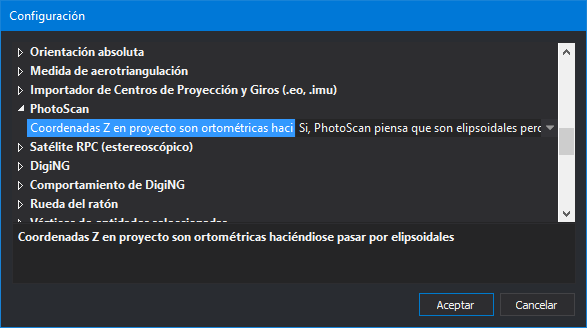
This configuration option we have in the menu Tools/Configuration/PhotoScan/Z coordinates in project pretending to be ellipsoidal and we have two options to choose:
- Yes, PhotoScan thinks they are ellipsoidal but they are orthometric.
- No, the coordinates were entered in PhotoScan correctly.
How does Digi3D.NET behave from now on if it is indicated in the configuration that the PhotoScan operator has entered the coordinates correctly?
- If you encounter a project file with a composite reference system, you will assume that the coordinate heights will be orthometric and therefore use a geoid model. The photogrammetric window in this case will send/receive coordinates in the reference system that appears in the project file and in the message bar of the photogrammetric window we will see coordinates in that system (which will usually be UTM with orthometric heights).
- If you encounter a project file with a horizontal reference system, it will assume that you are working with ellipsoidal heights, so the photogrammetric window will send/receive geographic coordinates (latitude, longitude, ellipsoidal altitude).
How does Digi3D.NET behave from now on if you are told in the configuration that PhotoScan thinks they are ellipsoidal but they are orthometric?
The photogrammetric window in this case will work in a special way: It will assume (in the mathematical operations that have to do with PhotoScan) that the Z coordinates are ellipsoidal, so it will not use in any case a geoid model, but will publish to the rest of the components of Digi3D.NET that it has a vertical system that is not ellipsoidal.
- If it encounters a project file with a horizontal reference system (such as WGS84 / UTM Zone 30N) and the user has configured the option Tools/Configuration/coordinate reference system/Request vertical system for sensors to No, the photogrammetric window will communicate to the rest of the Digi3D.NET components that it sends/receives coordinates in the system composed of the horizontal that appears in the project file and the unknown vertical.
- If you find a project file with horizontal reference system (such as WGS84 / UTM Zone 30N) and the user has configured the option Tools/Configuration/coordinate reference system/Request vertical system for sensors to Yes, when loading the model Digi3D.NET will request in a dialog box the vertical system. From this moment on, the photogrammetric window will communicate to the rest of the Digi3D.NET components that it sends/receives coordinates in the system composed by the horizontal that appears in the project file and the vertical selected by the user.
- If it encounters a project file with a composite reference system, the photogrammetric window will tell the rest of the Digi3D.NET components that their reference system is exactly the composite that appears in the PhotoScan project file.