Improvements in the MOD and MOD_Z commands with closed lines
DigiNG.NET has significantly improved the behavior of the commands MOD and MOD_Z when modifying closed lines and polygons.
When modifying a closed line, there are two solutions. In previous versions of Digi3D, the application modified the line without asking which solution to use. In addition, if the area affected by the modification crossed the closed line's origin, the behavior was unpredictable.
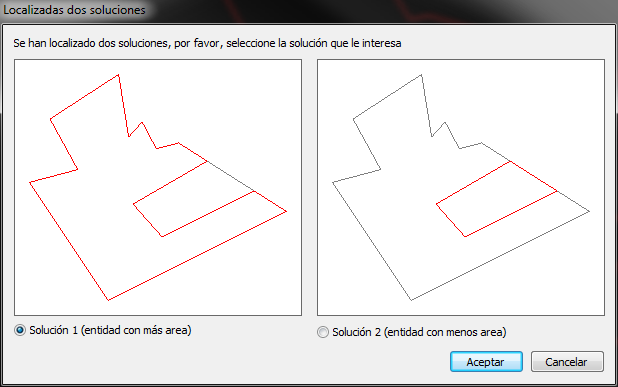 DigiNG.NET has greatly improved this behavior, because if it detects that the user is modifying a closed line, before modifying the line it displays a dialog box titled Two solutions found in which the user is asked to select the solution he is interested in. In the left part of the dialog box will be shown the solution with the largest area and in the right part the solution with the smallest area. The option selected by default in this dialog box will always be the option with the largest area.
In the graphs, the unmodified entity is drawn in gray, and the solution in red, so that it is very easy to see the modification that will be made to the geometry.
Polygons
If we modify the extesior boundary of a polygon, and it has gaps, the program will not show the dialog box and will stay with the solution that makes all the gaps remain holes of the polygon. If the modification is so large that it excludes any gap in the polygon, the modification will not be allowed.