Improvements to automatic aerial triangulation measurement
We have made three improvements to the automatic measurement of aerial triangulations in Digi3D.NET:
Ability to compress the aerial triangulation file
The automatic aerial triangulations measurement module stores in the project file (with extension .aerotriangulacion.xml) a history of all observations, both those that were considered valid and those that failed for some reason (correlation factors or excessive parallax). We store the history of the points that have failed to be able to do retrospective analysis, to find out the cause for which a particular observation has failed in the correlation process.
Including these failed observations can cause the project file to grow a lot, if we are not going to analyze these observations, it is advisable to delete them permanently.
For this we will use the option aerial triangulation/Edit/Compress (delete all disabled observations) in the main menu of Digi3D.NET
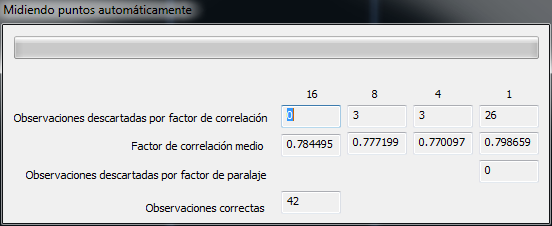
Improved the dialog box that shows the progress of the correlation.
The dialog box now shows several windows indicating the number of observations that have failed for correlation factors below the minimums required in pyramid levels 16,8,4 and 1, the average correlation factors in each pyramid level, the number of observations in pyramid level 1 that have been considered invalid because their parallax factor was greater than the maximum allowed and finally the number of valid observations.

Improvements in correlation speed with TIFF images
Critical sections (parts of the program that control access to a resource by multiple execution threads) have been relocated, significantly improving correlation speed.