Improved error reporting in Digi3D.NET topology analyses
We have added several improvements in Digi3D.NET to reporting errors related to topology formation.
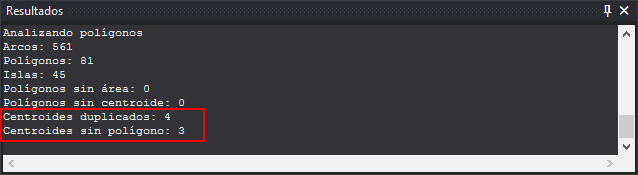
Until now, if duplicate centroids (within the same polygon) and centroids without an associated polygon were found, they were counted as errors of the same type. We have separated these errors into two different types, so that now, if errors of both types are found, the program shows two separate counts as you can see in the following screenshot:
 In addition, we have improved error communication in the task pane: each of the centroids now appears as a sub-task, so that the photogrammetric window focuses on them when double-clicked:
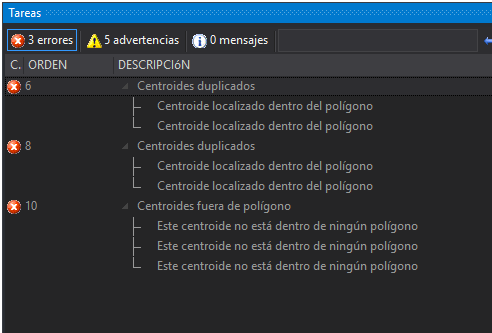 If you double-click on the main node (e.g. "Duplicated centroids") the program will zoom in to show all the centroids involved in that problem.
If you double-click on a particular error the program will center the window on that error for you to quickly identify it.
If you double-click on the main node (e.g. "Duplicated centroids") the program will zoom in to show all the centroids involved in that problem.
If you double-click on a particular error the program will center the window on that error for you to quickly identify it.