Improvements to the batch tool for creating tiles and pyramid levels from TIFF files.
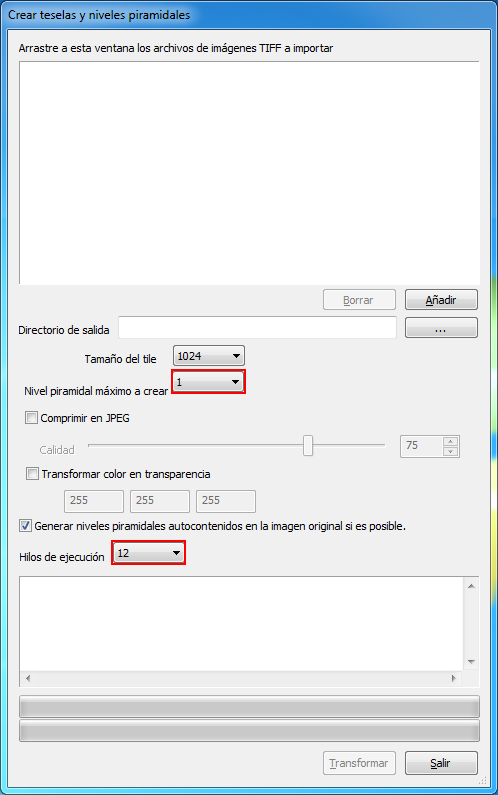 The tile and pyramid level generation program for tiff files for Digi3D.NET has been updated with two changes:
Now allows you to specify that the maximum pyramid level is 1, i.e. that it does not create pyramid levels.
I personally have used it for the following: I have received a hard disk with 644 tiff images (352 GB), without tessellation, not compatible with Digi3D.NET to make an automatic correlation measurement. The automatic correlator of aerial triangulations of Digi3D.NET requires that the original images are tesselated, but does not require that they have pyramidal levels, because the original images are not those with which it correlates (these images, for your information, are in grayscale, regardless of whether the originals are in color or not, and are also rotated to get the best possible correlation factors).
Digi3D.NET uses these original images to create temporary images, and it is with these temporary images that it correlates.Digi3D.NET does not require the original images to have pyramidal levels to create temporary images, but it does require them to be tesselated.
The project (like everything) was in a hurry, and creating pyramid levels of 352 GB of images takes time, so as I had to quickly make the images compatible with the Digi3D.NET, I used this option (select 1 as maximum pyramid level) to *tile them *.
Once the correlation was completed, I rerun the program on the already tesselated images and told it to reach the pyramid level 128. As the images were already tesselated, simply created the pyramid levels as external files.
The number of processors options box now adapts to the computer hardware.
Until now, the number of parallel processors for transforming images options box was static, always showing options from 1 to 4, if the computer had more than 4 processors there was no way to take advantage of them with a single instance of the program.
In the screenshot accompanying this article you can see the options displayed on a computer with 12 processors.