Improvements to the coordinate reference system selection dialog box in Digi3D.NET
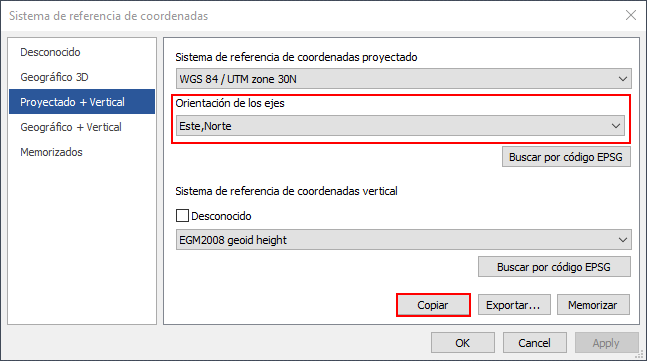 We made two improvements to the coordinate reference system selection dialog in Digi3D.NET:
- From now on, we can select the order of the axes in the horizontal coordinate systems that are part of the coordinate reference system composed Projected + Vertical.
- We can now store the coordinate reference systems in the Windows clipboard.
Until now we could only select the order of the axes in the Geographic 3D systems and in Geographic + Vertical, now we can also select the order of the axes in Projected + Vertical. We can select one of the following options:
- Standard (the order of the axes from the EPSG database will be obtained).
- East, North (forces the first axis to point to East and the second axis to point to North).
- North, East (forces the first axis to point to North and the second axis to point to East).
To copy the WKT string to the clipboard, simply press the Copy button that appears on the different pages of the dialog box.