Configuration files and tables are now displayed in HTML
We have added new functionality to the configuration files and to the different table types of Digi3D.NET that will make these files much more user friendly. Many years ago we started with the migration of files from tables to format .XML:
- The migration started in the year 2000 with Digi3D 2000 in which the alias files (which are the files that give names to the commands) were already in .XML.
- Then it was Digi3D 2007 that introduced many changes, including moving from the old Digi.tab tables to the new Digi.tab.xml format, the menu file menu.xml and the incorporation of the .orientation.xml files.
- In Digi3D.NET only the key files had to be transformed to .XML and we added those changes.
The problem with .XML files is that browsers display them as they are written, and they are not easily interpreted by the user as you can see in this cut out of a code table:
<?xml version="1.0" encoding="utf-8"?>
<digitab xmlns:odt="http://schemas.digi21.net/DigiNG/DigiTab/StyleOldDigiTab/v1.0" xmlns:iobind="http://schemas.digi21.net/DigiNG/IO/bind/v1.0" xmlns:iobin="http://schemas.digi21.net/DigiNG/IO/bin/v1.0" xmlns:iodgn="http://schemas.digi21.net/DigiNG/IO/dgnv8/v1.0" xmlns:iodwg="http://schemas.digi21.net/DigiNG/IO/dwg/v1.0" xmlns:iocsv="http://schemas.digi21.net/DigiNG/IO/csv/v1.0" xmlns:iokml="http://schemas.digi21.net/DigiNG/IO/kml/v1.0" xmlns:ioshp="http://schemas.digi21.net/DigiNG/IO/ShapeFile/v1.0" xmlns:ioGeomedia="http://schemas.digi21.net/DigiNG/IO/Geomedia/v1.0"  bgColor="0 0 0" colorUnknown="127 127 127" colorSnap="0 0 255">
    <codes>
        <code name="010123" description="Límite provincial" tags="" type="1" command="" helpFile="" table="" conditions="" print="1" streamMode="0">
            <representation style="1" color="15" color-stereo="15" width="1" width-stereo="1" print-color="15" print-width="0.010000" fontTT="Arial" weightTT="0" italic="0" />
            <io>
                <iobin:transform code="010123"/>
...
It is obvious that this format is not very good for people who do not know .XML...
On September 21 of 2011 I published in the Digi3D.NET development blog a way to make code tables printable Print keyboard settings, but to do that it was necessary to modify the key file and create a transformation file, and that obviously again required knowledge of XML, and also if the user made a modification on the key configuration file, it had to be re-modified manually to display it in table form.
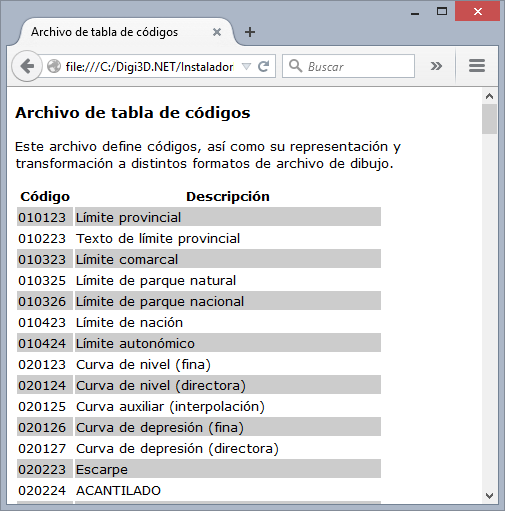
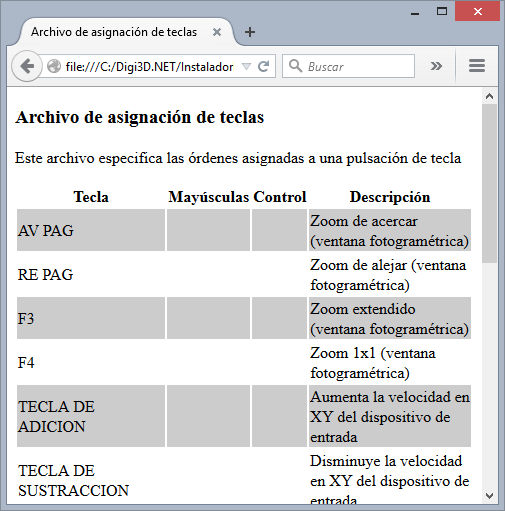
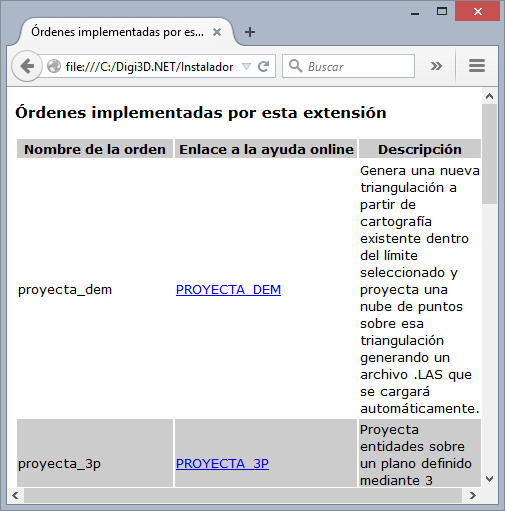
We just modified Digi3D.NET to automatically generate .XML files with auto-content format, so that if you now open (only with Firefox and Google Chrome -I haven't tried it with Microsoft Edge yet, but definitely with Internet Explorer it doesn't work) any file, it will be displayed in a nice way for the user.
Below you have a screenshot of Firefox showing a code table Digi.tab.xml, the default key configuration file (both installed in the folder %ProgramData%\Digi3D.NET\Tablas) and one of the alias files (which are installed in %ProgramFiles%\Digi21.NET\Digi3D.NET\es-ES)