Importing symbols from MicroStation cell files
The program Code Table Editor every day incorporates more functionality. On this occasion, we have added a tool that will help users who regularly work with files in MicroStation format. This tool allows you to import the symbols contained in a cell file (.cel) in .bin format. This way we have available in Digi3D.NET all symbols contained in the cell file. To perform this task we will have to follow the following steps:
- We run the program Code Table Editor.
- We select the menu option Tools/Symbols/Import symbols from MicroStation .cel file.
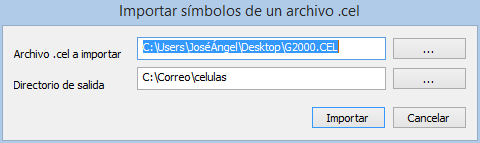
- The Import symbols from a .cel file. dialog box appears
- We indicate the path to the .cel file to import and the output directory (by default the output directory shown will coincide with the symbol directory configured in the program).

- Press the Import button and the symbols will be imported.