Importing codes from a .dgn file
We have added a new functionality to the Code Table Editor to automatically create in a code table as many codes as layers are located in a .dgn file. In addition, it is optionally possible to specify a cell file (.celIf this file is specified, as many dot codes as cells appear in this file will be automatically generated. All generated codes will have associated their own display style, with the same colors and thicknesses as in the original file. To run this functionality, we have to follow the following steps:
- Run the program Code table editor.
- Select the menu option Codes/Import .dgn file codes...
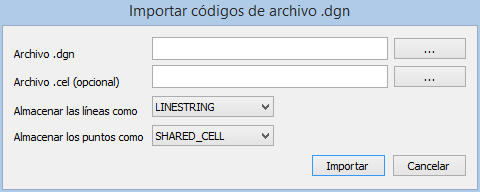
- The Import codes from .dgn file: dialog box appears.

- We indicate the path of the .dgn file that we want to import.
- Optionally we indicate the path of the .cel file with cells for the extraction of point codes.
- We indicate the entity type with which linear entities will be stored.
- We indicate the entity type with which the point entities will be stored.
- Press the Import button.
You can learn more on the help page for this importer in the online help of Digi3D.NET.