Real-time quality control with Digi3D.NET's new triggers feature
Introducing a new feature in Digi3D.NET which will increase productivity as well as avoid quality control revisions: Triggers.
Triggers are actions that are executed at a certain time if a certain condition is met.
Initially, the codes have no trigger assigned, but we can assign as many triggers as we want to each code using the Code table editor, in the Codes tab, in the Triggers section, in the property When registering the entity.
If we press the three dots button, the Triggers dialog box will appear.
 If we press the Add button, the Trigger Settings dialog box will appear.
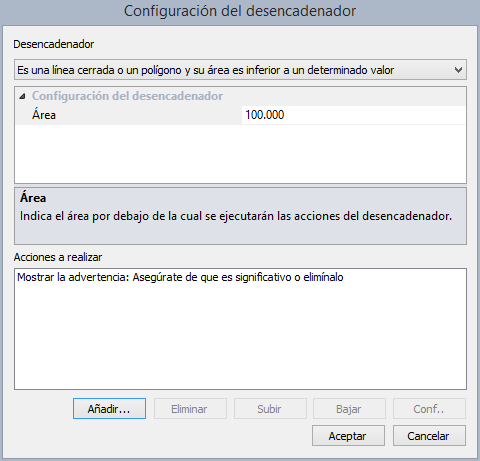 In this dialog box we can select a trigger from the list above, such as the one shown in the screenshot: Is a closed line or a polygon and its area is less than a particular value.
Depending on the type of trigger we select, we will have to fill in more or less properties in the properties pane Trigger Configuration. In the previous screenshot we see that the program is requesting the area below which actions will be executed.
Once the trigger has been configured, we can add actions by pressing the Add button, which will open the Action Configuration dialog box.
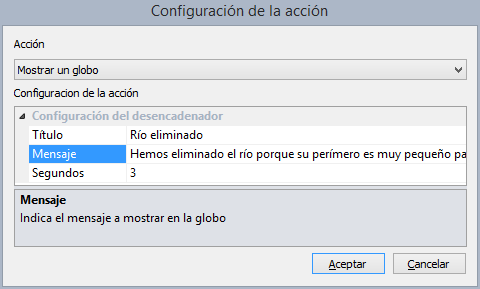 This dialog box has a drop-down to select the action to add, and a properties window in which to configure the selected action. In the screenshot we can see that the action Show a balloon asks us to enter both the title of the balloon and the main message and the number of seconds that the balloon will be displayed on screen.
For now the list of triggers is limited, but it will grow soon. We can choose the following triggers:
| Trigger name | Condition for your actions to be executed |
|---|---|
| Is a closed line or polygon and its area is less than a certain value | If a closed line is recorded and its area is less than the one configured in the trigger |
| Is a line and its perimeter in the plane is less than a certain value | If a line is recorded and its perimeter in the plane is smaller than the one configured in the trigger |
| It is a line and its perimeter 3D is less than a certain value | If a line is registered and its perimeter in XYZ is smaller than the one configured in the trigger |
For now we have the following list of actions (you can put as many as you want in a trigger, even several times the same, such as showing a warning box and then another and then another...)
| Name of the action | Description | A typical use |
|---|---|---|
| Show a message box | Displays a warning to the operator. This is an invasive method, as it requires the operator to press the OK button to confirm that they have read the warning. | If a building with a small area is drawn, a message can be displayed to the user indicating that it should be deleted unless it is significant (religious, military building,...) |
| Show a globe | Displays a non-invasive warning that self-disappears. | For example, to indicate that the entity that has just been digitized has been deleted because it did not meet the criteria of the model.Example: The tributary line has been deleted because its size does not meet the minimum requirement to be digitized. |
| Show website | Opens the default web browser at the specified URL. | For example to show the user the instructions to follow to digitize a particular code. |
| Play an error sound | Plays the error sound configured in the program. | It is used for the user to have an audible alert that something strange has happened. |
| Synthesize Voice | Makes the computer synthesize speech with the given message | It is used for the user to have information by synthetic voice. |
| Cancel the entity | Does not allow the entity that has just been digitized to be stored. | For example, if the perimeter of the line that has just been digitized is less than the minimum required for that code. |
| Change the entity code | Changes the entity code to the specified one. | For example, when drawing a lake, its area does not meet the requirements of a lake but of a lagoon. |
| Insert a point | Run the command POINT to force the operator to digitize a point. | For example, if the area of the building that has just been digitized is not enough for it to be represented as a polygon, you can create a trigger that has two actions: 1. Remove the entity 2. Force the user to digitize a point. |
| Insert a dot in another code | Changes the active code to the specified one and executes the command POINT to force the operator to digitize a point. | For example, if the area of the building that has just been digitized is not enough for it to be represented as a polygon, you can create a trigger that has two actions: 1. Remove the entity 2. Force the user to digitize a point. |
In the following video you can see this functionality in action: [youtube:http://youtu.be/9WS6GKrds2A]