Character sets for TrueType fonts in the code table
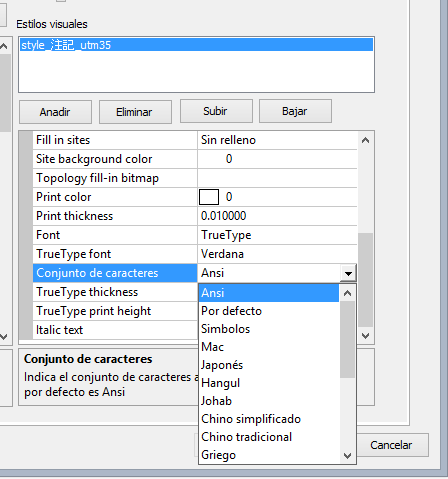 Because Digi3D.NET is now used also in Japan, we have had to add a new option in the code tables editor. This option is useful only if the font assigned to a code is a TrueType font, and allows us to indicate the Character set we are interested in creating from that particular font.
The default option for this value is Ansi, so if you load a code table created with a previous version of Digi3D.NET that did not request this information, it will be assigned the default value Ansi.
I will explain here the reason for adding this new option and obviously its meaning:
Digi3D.NET displays graphical information using OpenGL technology. This graphics technology does not understand text, it only understands dots, lines and triangles. Everything you see on the screen is made up of dots, lines and triangles, even text!
To be able to draw texts, what Digi3D.NET does when loading the model is exploit the TrueType fonts of the system in OpenGL commands that will draw each of the characters of the font using dots, lines and triangles.
This process (which is performed by the wglUseFontOutlines function) is time and memory consuming, so Digi3D.NET does not exploit all fonts on the system, but only exploits the fonts listed in the active code table, so if two TrueType fonts, such as Times New Roman and Verdana, are detected in the code table, Digi3D.NET will only exploit those fonts.
In addition, the first step to exploit a font is to create it (Digi3D.NET does this by using the CreateFontIndirect function), and this process can also be slow and expensive, since a font can have up to 65536 different characters, Latin, Greek, Cyrillic,... (if you are interested in knowing all the character types that can be stored in a single font, you can get here more information).
Creating the complete font can take time and consume a lot of memory (both RAM and the graphics card), so it does not make much sense to create it completely (I doubt very much that there is a case in which in a drawing file appear texts in Cyrillic and in Japanese and in Hebrew simultaneously), so the CreateFontIndirect function receives a parameter that allows us to indicate the set of characters that we want to incorporate the font, and that parameter can be controlled with the modification that we present today in the code table. This parameter is called Character set.
We can indicate the following character sets:
| Ansi | Specifies the Latin character set |
| Default | Specifies the character set based on the system location. If your operating system is Arabic, then the Arabic character set will be created. If your operating system is Korean Hangul, then the Korean Hangul character set will be created. |
| Symbols | Specifies the character set of symbols |
| Mac | Specifies the Apple Macintosh character set |
| Japanese | Specifies the Japanese character set |
| Hangul | Specifies the character set Korean Hangul |
| Johab | Specifies the character set Korean Johab |
| Simplified Chinese | Specifies the character set Simplified Chinese |
| Traditional Chinese | Specifies the Chinese Traditional character set |
| Greek | Specifies the Greek character set |
| Turkish | Specifies the character set Turkish |
| Vietnamese | Specifies the Vietnamese character set |
| Hebrew | Specifies the Hebrew character set |
| Arabic | Specifies the Arabic character set |
| Baltic | Specifies the character set Baltic (Northeast Europe) |
| Russian | Specifies the character set Russian |
| Thai | Specifies the Thai character set |
| Eastern Europe | Specifies the Eastern European character set |
| OEM | Specifies other character sets. These are character sets added by the manufacturer (Original Equipmen Manufacturer), as for example if NASA creates a character set |
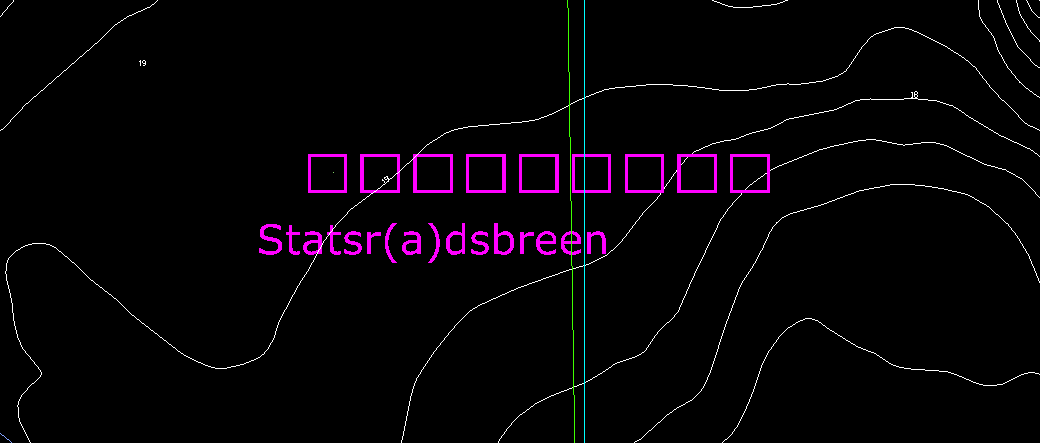
So if a certain code is going to display texts in Japanese, we will have to select the Japanese option for that code, if we do not, the Japanese characters will be displayed as squares as you can see in the following screenshot.