Load files by areas of interest
We have just added to Digi3D.NET the possibility to load drawing files by regions of interest.
For now we have implemented this functionality in the importer/exporter of Shapefiles and Geomedia, but little by little we will update the different importers/exporters to implement it.
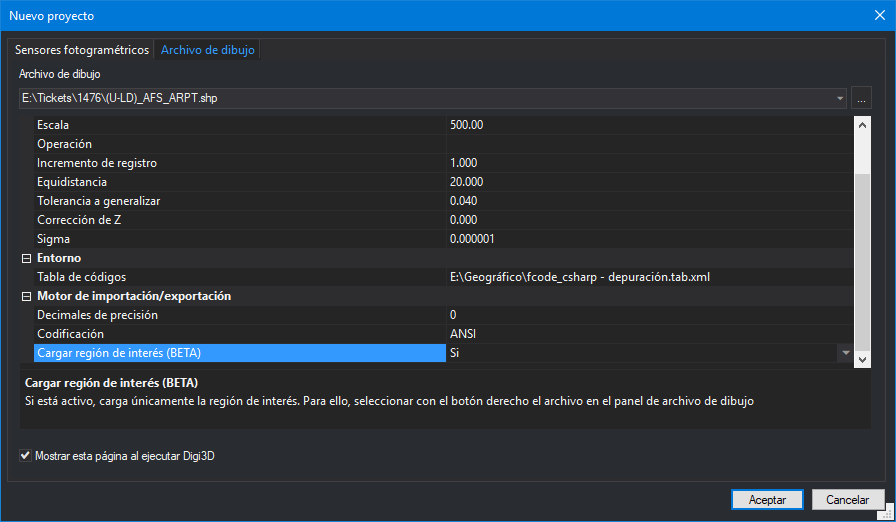 From now on, when loading a Shapefile file, the program shows in the section Import/export engine the option Load region of interest (BETA).
If we indicate yes in this option, Digi3D.NET will load the drawing file but will not read its geometries, it will wait until we tell it to load them.
To cause them to load we have to execute the menu option: File/Reload files that support region of interest with entities that overlap the active window (BETA).
From now on, when loading a Shapefile file, the program shows in the section Import/export engine the option Load region of interest (BETA).
If we indicate yes in this option, Digi3D.NET will load the drawing file but will not read its geometries, it will wait until we tell it to load them.
To cause them to load we have to execute the menu option: File/Reload files that support region of interest with entities that overlap the active window (BETA).
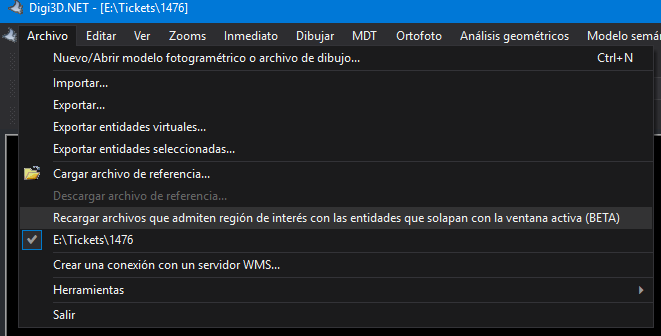 This menu option is enabled only when we have uploaded at least one file that supports loading by regions of interest.
When it is selected, all loaded files that support loading by region of interest are ordered to load the geometries that overlap with the current drawing window.
When we reload a file by this method, the geometries that do not overlap with the current window are downloaded and disappear. If we want them to appear again, we will have to modify the position and/or zoom of the drawing window to make sure that they are within the drawing window and again execute the menu option to force to reload the files.
You can see this new feature in action in the video below:
This menu option is enabled only when we have uploaded at least one file that supports loading by regions of interest.
When it is selected, all loaded files that support loading by region of interest are ordered to load the geometries that overlap with the current drawing window.
When we reload a file by this method, the geometries that do not overlap with the current window are downloaded and disappear. If we want them to appear again, we will have to modify the position and/or zoom of the drawing window to make sure that they are within the drawing window and again execute the menu option to force to reload the files.
You can see this new feature in action in the video below: