Search for entities based on their database attributes
We just added a new search engine in the search pane of Digi3D.NET that will allow you to search the entities that have associated some database attribute. Just load a model with database (like a .shp file for example) and follow the following steps:
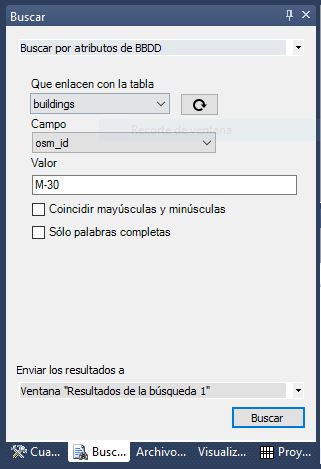 Opens the search pane (Edit/Find menu).
- Select the search engine Search by database attributes.
- Press the button with the regenerate icon to regenerate the dropdowns of Table and Field.
- Select the table, field, and value you want to locate.
- Select where you want to send the search result (Results window 1, Results window 2 or to the active command)
- Press the Search button.
The tool allows you to search for full words, words within records, and indicate whether case matches should be used. As you know, we publish the source code of all search engines in our GitHub repository, you can see how to program this functionality yourself by following the following link: https://github.com/digi21/Buscadores/blob/master/BuscarPorCampoBBDD.cs You can see this feature in action in the following video: