Added support for working with Geomedia Datawarehouse files (.mdb)
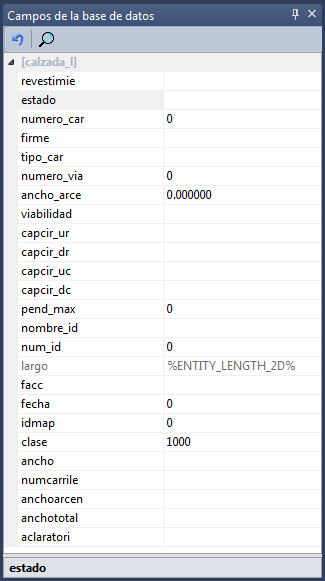 It is now possible to work in DigiNG.NET natively in .mdb files in Datawarehouse of Geomedia format, without importing or exporting files.
It is not necessary to have installed a license of Geomedia to work with this type of files. The implementation is native, without third-party libraries such as Geomedia Objects so that the performance is optimal.
For the user it is very simple, just select in the Drawing file field of the Drawing file tab of the New project dialog box a file with extension .mdb in Geomedia Datawarehouse format.
If we do not have a code table, DigiNG.NET will add codes to the code table active at the time of loading, but only in memory. If we want to store that table we will have to do it with the only tool available for this purpose that is the Code table editor that we can run in Start / All programs / Digi21.net / Digi3D.NET / Digi3D.NET.
DigiNG.NET allows us to create new entities as well as delete existing entities or modify them. In addition, before storing a new entity we can indicate in the dockable pane Database fields the value of the fields that will be stored together with the geometry, and we can modify existing records in the database with the command EDIT_CODES.
entities deleted
Geomedia does not allow to indicate if a particular entity is deleted or not. In Geomedia if an entity is deleted, all traces of it disappear. The work philosophy of Digi users, however, allows entities to be marked to be recovered later and to be able to perform an unlimited number of operations Undo. To allow working with Digi philosophy in Geomedia files, DigiNG.NET will add two tables to the database: Digi3D_Tables and Digi3D_Deleted, where information about deleted entities is stored. If we delete entities and do not compress, when opening the .mdb file with Geomedia, it will show the deleted entities. To permanently delete the entities we will have to execute the command COMPRESS.
Limitations
- DigiNG.NET is not capable of creating a Geomedia datawarehouse file on its own, it requires us to use a seed file (a .mdb file created by Geomedia that only has the corresponding tables) provided by the customer.
- DigiNG.NET cannot fill the space key field of Geomedia because it is a patented algorithm, but this is not a problem because DigiNG.NET does not need it and the end user can fill it automatically with the execution of a command in Geomedia.
- For now, DigiNG.NET is not able to recognize the reference coordinate system of the .mdb file, therefore the user has to manually specify in the fields Horizontal and vertical reference coordinate system of the section Import/export engine of the drawing file tab of the New project dialog box.
For now you cannot store entities of type TEXT.